
Persistence
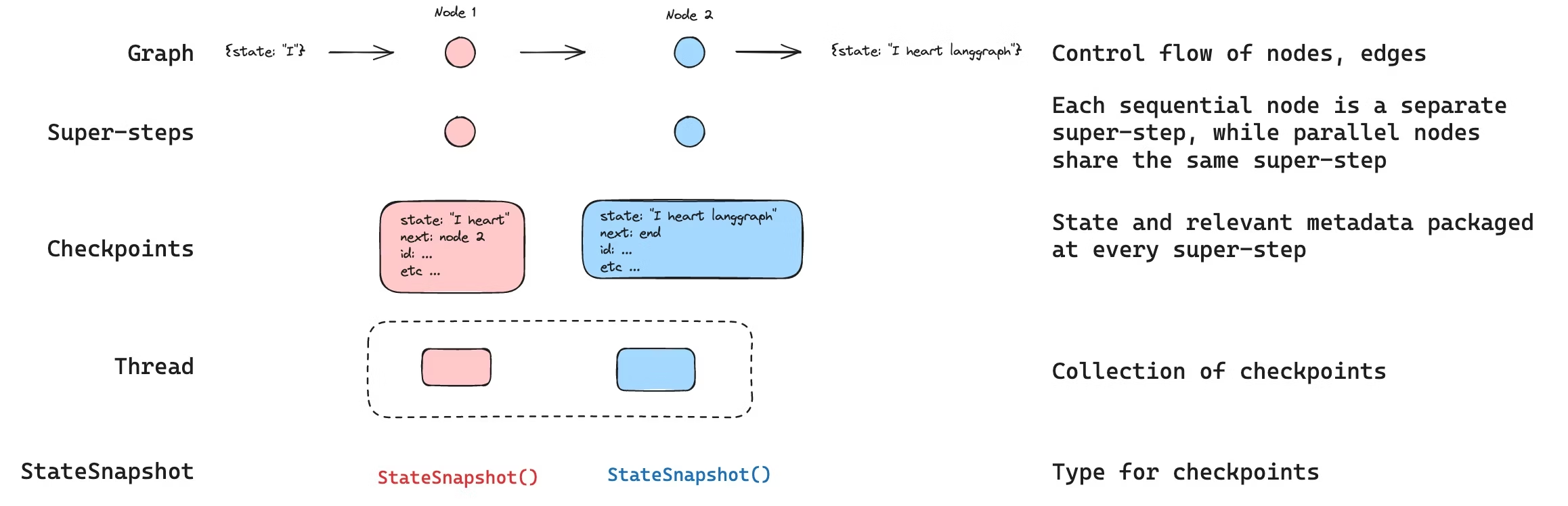
LangGraph 具有内置的持久层,通过checkpointer实现。当你使用checkpointer编译graph时,在每个超级步骤该checkpointer会保存一个图状态的checkpoint 。这些checkpoints保存在一个thread中,可以在图执行后访问该线程。 由于threads允许在执行后访问图的状态,因此可以实现包括人机交互、内存管理、时间旅行和容错在内的多种强大功能。
INFO
**代理服务器会自动处理 checkpointing ** 使用代理服务器时,您无需手动实现或配置 checkpointers 。服务器会在后台为您处理所有持久化基础架构。
Threads
线程是分配给checkpointer保存每个checkpoint的唯一 ID 或线程标识符。它包含了一系列runs的累积状态。当run被执行时,助手底层图的state将被持久化到线程中。
使用checkpointer调用图时,必须在配置的configurable部分中指定 thread_id
{"configurable": {"thread_id": "1"}}可以检索线程的当前状态和历史状态。 要持久化线程状态,必须在执行操作之前创建线程。LangSmith API 提供了多个用于创建和管理线程及线程状态的端点。
checkpointer使用 thread_id 作为存储和检索checkpoints的主键。如果没有它,checkpointer就无法保存状态或在interrupt后恢复执行,因为checkpointer使用 thread_id 来加载已保存的状态。
Checkpoints
线程在特定时间点的状态称为checkpoint。checkpoint是每个超级步骤保存的图状态快照,由具有以下关键属性的 StateSnapshot 对象表示:
config: 与此checkpoint关联的配置。metadata: 与此checkpoint相关的元数据。values: 此时这个点的状态通道的值。next图中接下来要执行的节点名称元组。tasks: 包含有关要执行的下一个任务的信息的PregelTask对象元组。 如果该步骤之前已尝试过,则会包含错误信息。如果图在节点内部被动态中断,则任务将包含与中断相关的附加数据。
checkpoints会被持久化,并可用于在以后恢复线程的状态。
让我们看看当按如下方式调用一个简单的图时,会保存哪些checkpoints:
from langgraph.graph import StateGraph, START, END
from langgraph.checkpoint.memory import InMemorySaver
from langchain_core.runnables import RunnableConfig
from typing import Annotated
from typing_extensions import TypedDict
from operator import add

class State(TypedDict):
    foo: str
    bar: Annotated[list[str], add]

def node_a(state: State):
    return {"foo": "a", "bar": ["a"]}

def node_b(state: State):
    return {"foo": "b", "bar": ["b"]}


workflow = StateGraph(State)
workflow.add_node(node_a)
workflow.add_node(node_b)
workflow.add_edge(START, "node_a")
workflow.add_edge("node_a", "node_b")
workflow.add_edge("node_b", END)

checkpointer = InMemorySaver()
graph = workflow.compile(checkpointer=checkpointer)

config: RunnableConfig = {"configurable": {"thread_id": "1"}}
graph.invoke({"foo": "", "bar":[]}, config)运行graph后,我们预期会看到 4 个checkpoints:
- 空checkpoint,下一个要执行的节点为
START - checkpoint使用用户输入
{'foo': '', 'bar': []},并将node_a作为下一个要执行的节点 - checkpoint
node_a的输出为{'foo': 'a', 'bar': ['a']},并将node_b作为下一个要执行的节点。 - checkpoint
node_b的输出为node_b{'foo': 'b', 'bar': ['a', 'b']},且没有后续节点需要执行。
请注意,由于我们 bar 通道有 reducer 函数,因此 bar 通道值包含来自两个节点的输出。
Get state
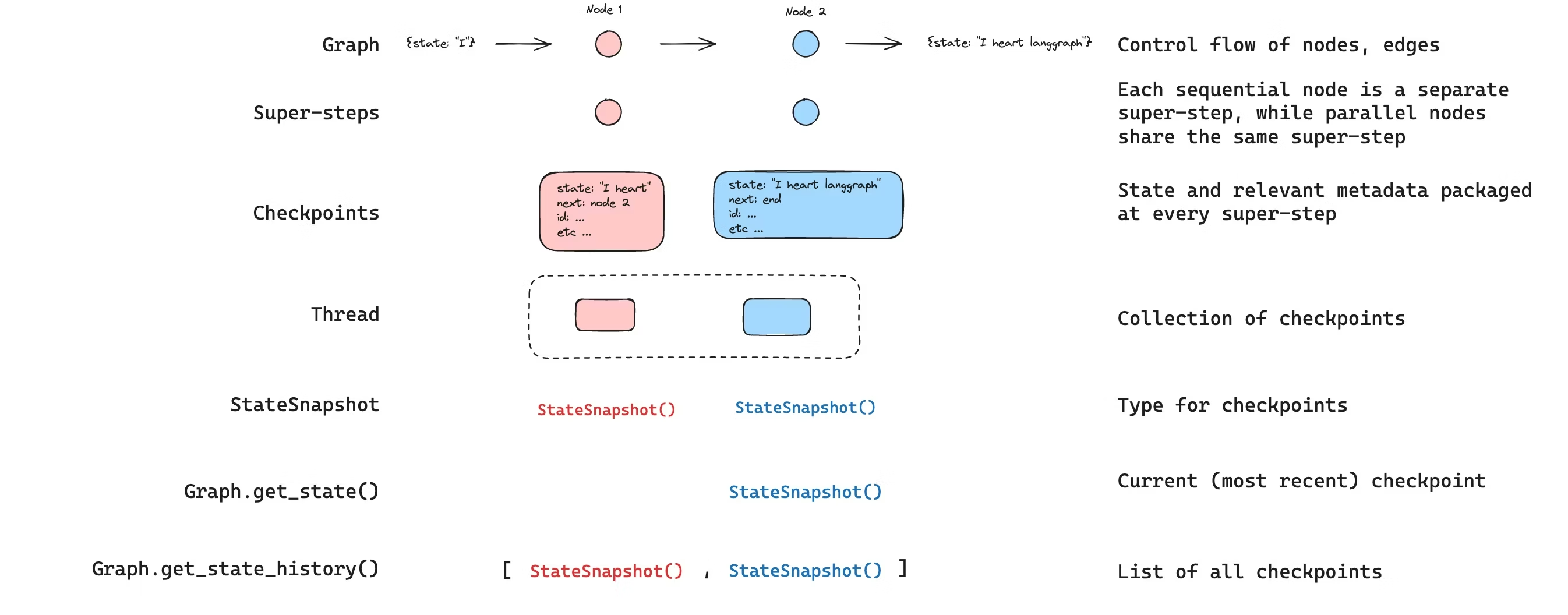
与已保存的图的状态交互时,必须指定thread identifier。您可以通过调用 graph.get_state(config) 查看图的最新状态。这将返回一个 StateSnapshot 对象,该对象对应于配置中提供的线程 ID 关联的最新checkpoint,或者对应于为该线程提供的checkpoint ID 关联的checkpoint(如果已提供)。
# get the latest state snapshot
config = {"configurable": {"thread_id": "1"}}
graph.get_state(config)

# get a state snapshot for a specific checkpoint_id
config = {"configurable": {"thread_id": "1", "checkpoint_id": "1ef663ba-28fe-6528-8002-5a559208592c"}}
graph.get_state(config)get_state 的输出将如下所示:
StateSnapshot(
    values={'foo': 'b', 'bar': ['a', 'b']},
    next=(),
    config={'configurable': {'thread_id': '1', 'checkpoint_ns': '', 'checkpoint_id': '1ef663ba-28fe-6528-8002-5a559208592c'}},
    metadata={'source': 'loop', 'writes': {'node_b': {'foo': 'b', 'bar': ['b']}}, 'step': 2},
    created_at='2024-08-29T19:19:38.821749+00:00',
    parent_config={'configurable': {'thread_id': '1', 'checkpoint_ns': '', 'checkpoint_id': '1ef663ba-28f9-6ec4-8001-31981c2c39f8'}}, tasks=()
)Get state history
您可以通过调用 graph.get_state_history(config) 获取给定线程的完整图执行历史记录。这将返回与配置中提供的线程 ID 关联的 StateSnapshot 对象列表。重要的是,checkpoints将按时间顺序排列,最新的 checkpoint / StateSnapshot 位于列表的首位。
config = {"configurable": {"thread_id": "1"}}
list(graph.get_state_history(config))在我们的示例中,get_state_history 的输出将如下所示:
[
    StateSnapshot(
        values={'foo': 'b', 'bar': ['a', 'b']},
        next=(),
        config={'configurable': {'thread_id': '1', 'checkpoint_ns': '', 'checkpoint_id': '1ef663ba-28fe-6528-8002-5a559208592c'}},
        metadata={'source': 'loop', 'writes': {'node_b': {'foo': 'b', 'bar': ['b']}}, 'step': 2},
        created_at='2024-08-29T19:19:38.821749+00:00',
        parent_config={'configurable': {'thread_id': '1', 'checkpoint_ns': '', 'checkpoint_id': '1ef663ba-28f9-6ec4-8001-31981c2c39f8'}},
        tasks=(),
    ),
    StateSnapshot(
        values={'foo': 'a', 'bar': ['a']},
        next=('node_b',),
        config={'configurable': {'thread_id': '1', 'checkpoint_ns': '', 'checkpoint_id': '1ef663ba-28f9-6ec4-8001-31981c2c39f8'}},
        metadata={'source': 'loop', 'writes': {'node_a': {'foo': 'a', 'bar': ['a']}}, 'step': 1},
        created_at='2024-08-29T19:19:38.819946+00:00',
        parent_config={'configurable': {'thread_id': '1', 'checkpoint_ns': '', 'checkpoint_id': '1ef663ba-28f4-6b4a-8000-ca575a13d36a'}},
        tasks=(PregelTask(id='6fb7314f-f114-5413-a1f3-d37dfe98ff44', name='node_b', error=None, interrupts=()),),
    ),
    StateSnapshot(
        values={'foo': '', 'bar': []},
        next=('node_a',),
        config={'configurable': {'thread_id': '1', 'checkpoint_ns': '', 'checkpoint_id': '1ef663ba-28f4-6b4a-8000-ca575a13d36a'}},
        metadata={'source': 'loop', 'writes': None, 'step': 0},
        created_at='2024-08-29T19:19:38.817813+00:00',
        parent_config={'configurable': {'thread_id': '1', 'checkpoint_ns': '', 'checkpoint_id': '1ef663ba-28f0-6c66-bfff-6723431e8481'}},
        tasks=(PregelTask(id='f1b14528-5ee5-579c-949b-23ef9bfbed58', name='node_a', error=None, interrupts=()),),
    ),
    StateSnapshot(
        values={'bar': []},
        next=('__start__',),
        config={'configurable': {'thread_id': '1', 'checkpoint_ns': '', 'checkpoint_id': '1ef663ba-28f0-6c66-bfff-6723431e8481'}},
        metadata={'source': 'input', 'writes': {'foo': ''}, 'step': -1},
        created_at='2024-08-29T19:19:38.816205+00:00',
        parent_config=None,
        tasks=(PregelTask(id='6d27aa2e-d72b-5504-a36f-8620e54a76dd', name='__start__', error=None, interrupts=()),),
    )
]
Replay
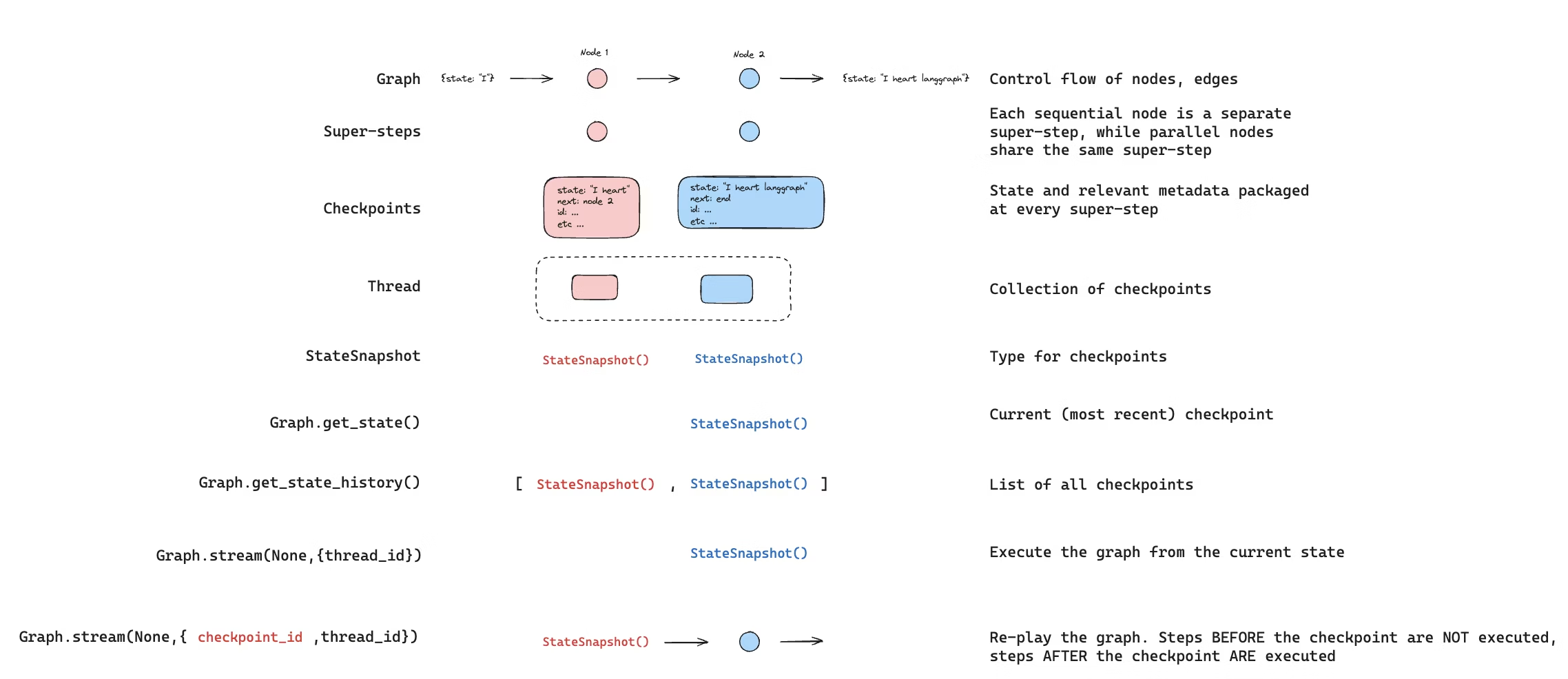
也可以回放之前的图执行过程。如果在invoke 图时使用 thread_id 和 checkpoint_id参数,那么我们将 重播 与 checkpoint_id 对应的checkpoint 之前 已执行的步骤,并且只执行checkpoint 之后 的步骤。
如果我们使用 thread_id 和 checkpoint_id 作为参数 invoke一个图,那么我们将 重播 与 checkpoint_id 对应的checkpoint 之前 已执行的步骤,并且只执行checkpoint 之后 的步骤。
thread_idis the ID of a thread.checkpoint_id是一个标识符,用于指代线程中的特定checkpoint。
在配置的 configurable 部分中调用该图时,必须传递这些参数:
config = {"configurable": {"thread_id": "1", "checkpoint_id": "0c62ca34-ac19-445d-bbb0-5b4984975b2a"}}
graph.invoke(None, config=config)重要的是,LangGraph 知道某个特定步骤是否之前已经执行过。如果存在checkpoint_id,LangGraph 只会 重播 图中的特定步骤,而不会重新执行该步骤,但只会重播所提供的 checkpoint_id 之前 的步骤。checkpoint_id 之后的所有步骤都会被执行(即创建一个新的分支),即使它们之前已经执行过。请参阅这篇how to guide on time-travel to learn more about replaying了解更多关于重播的信息。
Update state
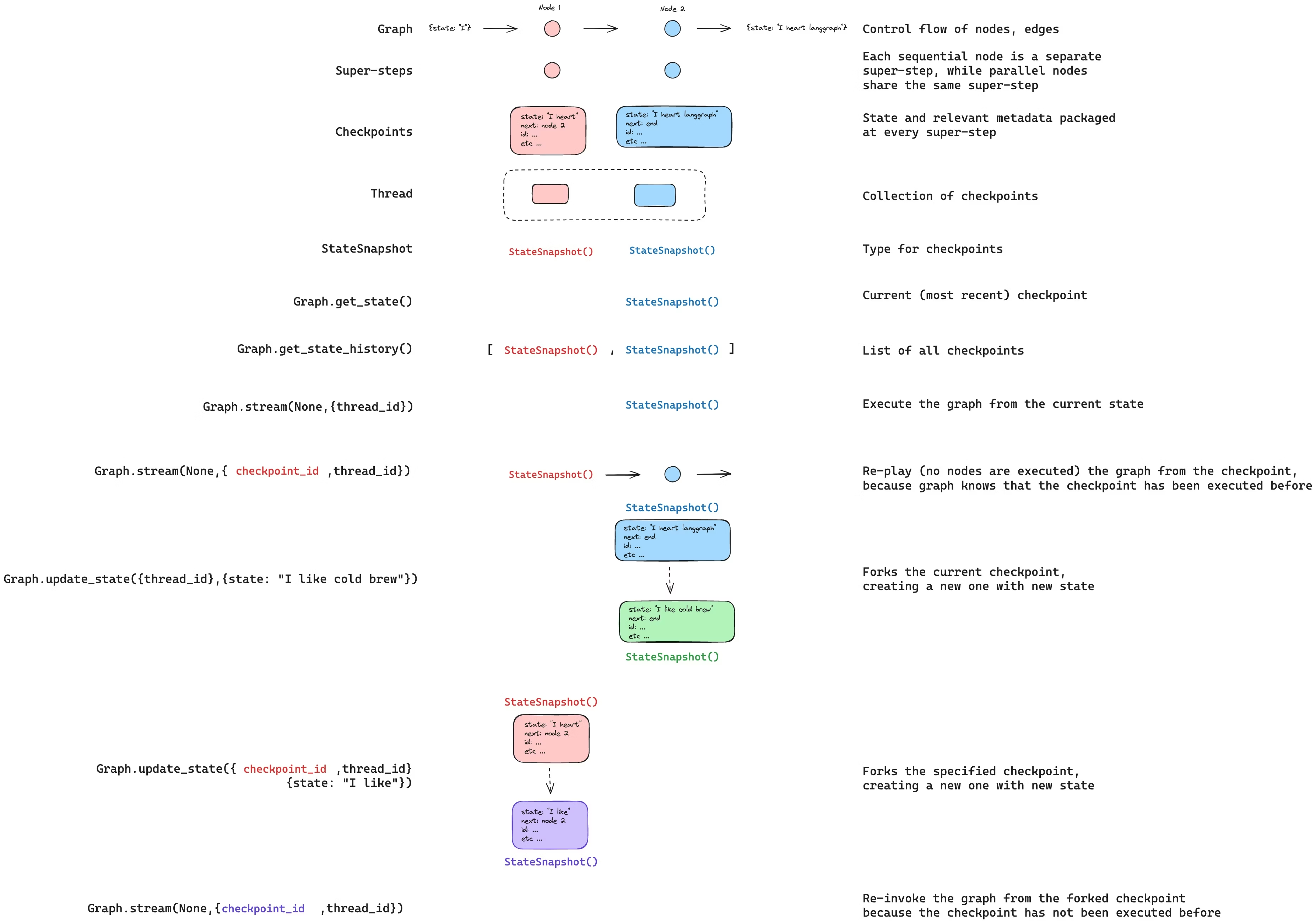
除了从特定 checkpoints 重放graph之外,我们还可以 编辑 图的 state。我们使用 update_state 来实现这一点。此方法接受三个不同的参数:
config
配置中应包含 thread_id,用于指定要更新的线程。如果只传递 thread_id ,我们会更新(或 fork)当前状态。如果同时传递 checkpoint_id 字段,则会 fork 选定的checkpoint。
values
这些值将用于更新状态。请注意,此更新的处理方式与来自节点的任何更新的处理方式完全相同。这意味着,如果这些值在图状态中的某些通道中已定义,则这些值将传递给 reducer 函数。这意味着 update_state 不会自动覆盖所有通道的值,而只会覆盖没有 reducer 的通道的值。我们来看一个例子。
假设您已使用以下模式定义了图的状态(参见上面的完整示例):
from typing import Annotated
from typing_extensions import TypedDict
from operator import add

class State(TypedDict):
    foo: int
bar: Annotated[list[str], add]现在假设图的当前状态为
{"foo": 1, "bar": ["a"]}如果你按如下方式更新状态:
graph.update_state(config, {"foo": 2, "bar": ["b"]})那么,图的新状态将是:
{"foo": 2, "bar": ["a", "b"]}foo key(通道)完全改变了(因为没有为该通道指定 reducer,所以 update_state 会覆盖它)。但是,bar key指定了一个 reducer,因此它会将"b"附加到 bar 的状态。how to guide on time-travel to learn more about forking state
as_node
调用 update_state 时,最后一个可选参数是 as_node。如果提供了该参数,相关更新将视为来自 as_node 节点。如果没有提供 as_node ,则在不产生歧义的情况下,将其设置为上次更新状态的节点。这之所以重要,是因为接下来要执行的步骤取决于最后一个发出更新的节点,因此可以利用这一点来控制接下来执行哪个节点。可以看看how to guide on time-travel to learn more about forking state
Memory Store
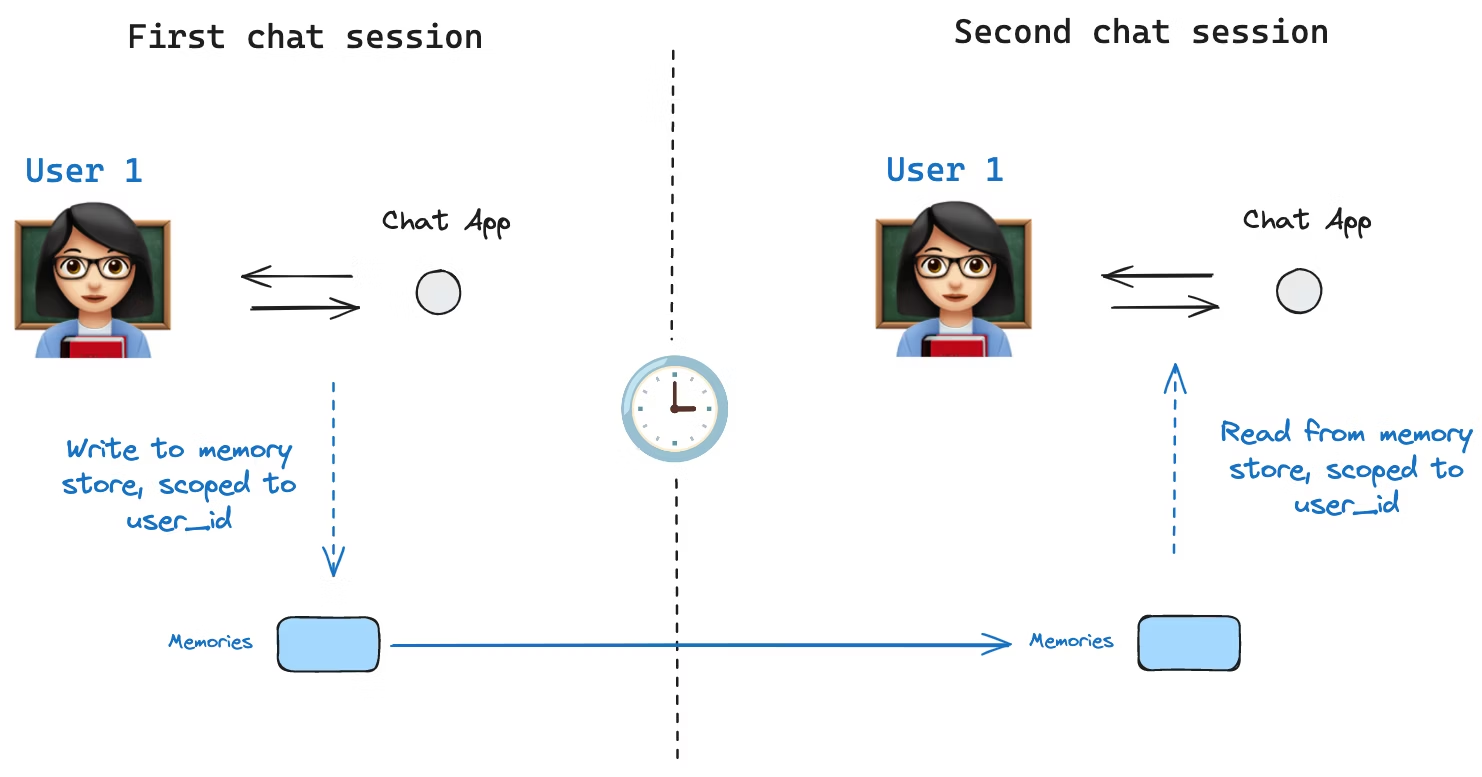
state schema 指定了一组键,这些键会在执行图的过程中被填充。如上所述,状态可以通过checkpointer在每个图步骤中写入线程,从而实现状态持久化。
但是,如果我们想在 跨线程 中保留某些信息该怎么办?例如,对于聊天机器人,我们希望在与该用户的 所有 聊天对话(例如,所有对话线程)中保留有关该用户的特定信息!
仅靠checkpointers,我们无法跨线程共享信息。这就促使我们需要 Store 接口。举例来说,我们可以定义一个InMemoryStore来跨线程存储用户信息。我们只需像之前一样,使用checkpointer编译我们的图,并加上我们新创建的 in_memory_store 变量即可。
INFO
LangGraph API handles stores automatically 使用 LangGraph API 时,您无需手动实现或配置存储。API 会在后台为您处理所有存储基础设施。
Basic Usage
首先,让我们在不使用 LangGraph 的情况下单独展示一下。
from langgraph.store.memory import InMemoryStore
in_memory_store = InMemoryStore()内存使用tuple进行命名空间划分,在本例中,该元组为(<user_id>, "memories")。命名空间可以是任意长度,可以代表任何内容,不必是用户特定的。
user_id = "1"
namespace_for_memory = (user_id, "memories")我们使用 store.put 方法将memories保存到 store 的命名空间中。这样做时,我们会指定命名空间(如上所述)以及内存的键值对:键只是内存的唯一标识符(memory_id),值(字典)是内存本身。
memory_id = str(uuid.uuid4())
memory = {"food_preference" : "I like pizza"}
in_memory_store.put(namespace_for_memory, memory_id, memory)我们可以使用 store.search 方法读取命名空间中的记忆,该方法会将给定用户的所有记忆以列表的形式返回。列表中最后一个是最近的记忆。
memories = in_memory_store.search(namespace_for_memory)
memories[-1].dict()
{'value': {'food_preference': 'I like pizza'},
 'key': '07e0caf4-1631-47b7-b15f-65515d4c1843',
 'namespace': ['1', 'memories'],
 'created_at': '2024-10-02T17:22:31.590602+00:00',
'updated_at': '2024-10-02T17:22:31.590605+00:00'}每种内存类型都是一个具有特定属性的 Python 类(Item)。我们可以通过上述的 .dict 方法将其转换为字典来访问。
The attributes it has are:
value: 该内存的值(它本身就是一个字典)key: 此命名空间中内存的唯一键namespace: 字符串列表,此内存类型的命名空间created_at: 此内存创建时的时间戳updated_at: 此内存更新的时间戳
Semantic Search
除了简单的检索功能外,该存储还支持语义搜索,允许您根据含义而非精确匹配来查找记忆。要启用此功能,请使用嵌入模型配置存储:
from langchain.embeddings import init_embeddings

store = InMemoryStore(
    index={
        "embed": init_embeddings("openai:text-embedding-3-small"),  # Embedding provider
        "dims": 1536,                              # Embedding dimensions
        "fields": ["food_preference", "$"]              # Fields to embed
    }
)现在,在搜索时,您可以使用自然语言查询来查找相关记忆:
# Find memories about food preferences
# (This can be done after putting memories into the store)
memories = store.search(
    namespace_for_memory,
    query="What does the user like to eat?",
    limit=3  # Return top 3 matches
)您可以通过配置fields参数或在存储记忆时指定index参数来控制记忆的哪些部分被嵌入:
# Store with specific fields to embed
store.put(
    namespace_for_memory,
    str(uuid.uuid4()),
    {
        "food_preference": "I love Italian cuisine",
        "context": "Discussing dinner plans"
    },
    index=["food_preference"]  # Only embed "food_preferences" field
)

# Store without embedding (still retrievable, but not searchable)
store.put(
    namespace_for_memory,
    str(uuid.uuid4()),
    {"system_info": "Last updated: 2024-01-01"},
    index=False
)Using in LangGraph
一切准备就绪后,我们在 LangGraph 中使用 in_memory_store。in_memory_store 与checkpointer密切配合:checkpointer将状态保存到线程(如上所述),而in_memory_store允许我们存储任意信息以供 跨 线程访问。我们使用checkpointer和in_memory_store来编译图,如下所示。
from langgraph.checkpoint.memory import InMemorySaver

# We need this because we want to enable threads (conversations)
checkpointer = InMemorySaver()

# ... Define the graph ...

# Compile the graph with the checkpointer and store
graph = graph.compile(checkpointer=checkpointer, store=in_memory_store)我们像以前一样使用 thread_id 调用图,同时还使用 user_id,我们将使用命名空间将我们的内存分配给这个特定的用户,如上所示。
# Invoke the graph
user_id = "1"
config = {"configurable": {"thread_id": "1", "user_id": user_id}}

# First let's just say hi to the AI
for update in graph.stream(
    {"messages": [{"role": "user", "content": "hi"}]}, config, stream_mode="updates"
):
print(update)我们可以通过传递 store: BaseStore 和 config: RunnableConfig 作为节点参数,访问 任何节点 中的 in_memory_store 和 user_id。以下是如何在节点中使用语义搜索来查找相关内存:
def update_memory(state: MessagesState, config: RunnableConfig, *, store: BaseStore):

    # Get the user id from the config
    user_id = config["configurable"]["user_id"]

    # Namespace the memory
    namespace = (user_id, "memories")

    # ... Analyze conversation and create a new memory

    # Create a new memory ID
    memory_id = str(uuid.uuid4())

    # We create a new memory
store.put(namespace, memory_id, {"memory": memory})如上所示,我们也可以访问任意节点中的 store,并使用 store.search 方法获取记忆。需要注意的是,记忆是以对象列表的形式返回的,该列表可以转换为字典。
memories[-1].dict()
{'value': {'food_preference': 'I like pizza'},
 'key': '07e0caf4-1631-47b7-b15f-65515d4c1843',
 'namespace': ['1', 'memories'],
 'created_at': '2024-10-02T17:22:31.590602+00:00',
'updated_at': '2024-10-02T17:22:31.590605+00:00'}我们可以访问这些存储器,并在我们的模型调用中使用它们。
def call_model(state: MessagesState, config: RunnableConfig, *, store: BaseStore):
    # Get the user id from the config
    user_id = config["configurable"]["user_id"]

    # Namespace the memory
    namespace = (user_id, "memories")

    # Search based on the most recent message
    memories = store.search(
        namespace,
        query=state["messages"][-1].content,
        limit=3
    )
    info = "\n".join([d.value["memory"] for d in memories])

# ... Use memories in the model call如果我们创建一个新线程,只要 user_id 相同,我们仍然可以访问相同的内存。
# Invoke the graph
config = {"configurable": {"thread_id": "2", "user_id": "1"}}

# Let's say hi again
for update in graph.stream(
    {"messages": [{"role": "user", "content": "hi, tell me about my memories"}]}, config, stream_mode="updates"
):
print(update)当我们使用 LangSmith 时,无论是在本地(例如在 Studio) 中)还是托管在 LangSmith 上,基本存储默认可用,无需在graph编译期间指定。不过,要启用语义搜索,您需要在 langgraph.json 文件中配置索引设置。例如:
{
    ...
    "store": {
        "index": {
            "embed": "openai:text-embeddings-3-small",
            "dims": 1536,
            "fields": ["$"]
        }
    }
}请参阅deployment guide了解更多详情和配置选项。
Checkpointer libraries
在底层,checkpointing机制由符合 BaseCheckpointSaver 接口的checkpointer对象驱动。LangGraph 提供了多种checkpointer实现,所有这些实现都是通过独立的、可安装的库实现的:
langgraph-checkpoint: checkpointer保存器的基本接口(BaseCheckpointSaver)和序列化/反序列化接口(SerializerProtocol)。包含用于实验的内存checkpointer实现(InMemorySaver)。LangGraph 自带langgraph-checkpoint。langgraph-checkpoint-sqlite: 这是一个使用 SQLite 数据库(SqliteSaver/AsyncSqliteSaver)的 LangGraph checkpointer实现。非常适合实验和本地工作流程。需要单独安装。langgraph-checkpoint-postgres: LangSmith 中使用的基于 Postgres 数据库(PostgresSaver/AsyncPostgresSaver)的高级checkpointer工具。非常适合生产环境使用。需要单独安装。
Checkpointer interface
每个checkpointer都符合 BaseCheckpointSaver 接口,并实现以下方法:
.put- 存储包含其配置和元数据的checkpoint。.put_writes- 存储与 checkpoint 关联的中间写入 (i.e. pending writes)..get_tuple- 根据给定的配置(thread_idandcheckpoint_id)获取checkpoint元组。这将用于在graph.get_state()中填充StateSnapshot。.list- 列出符合给定配置和筛选条件的checkpoints。这用于填充graph.get_state_history()中的状态历史记录。
如果checkpointer与异步图执行一起使用(即通过 .ainvoke, .astream, .abatch 执行图),则会使用上述方法的异步版本(.aput, .aput_writes, .aget_tuple, .alist)。
NOTE
要异步运行您的图,您可以使用 InMemorySaver,或者 Sqlite/Postgres checkpointers 的异步版本——AsyncSqliteSaver / AsyncPostgresSaver checkpointers。
Serializer
当 checkpointers 保存图状态时,需要序列化状态中的通道值。这是通过序列化器对象实现的。 langgraph_checkpoint定义了用于实现序列化的协议,提供了一个默认实现(JsonPlusSerializer),该实现可以处理各种类型,包括 LangChain 和 LangGraph 中 primitives, datetimes, enums 等等。
Serialization with pickle
默认序列化器JsonPlusSerializer底层使用 ormsgpack 和 JSON,但这并不适用于所有类型的对象。
如果您希望对于 msgpack 编码器当前不支持的对象(例如 Pandas 数据帧)回退到 pickle 格式,可以使用pickle_fallback以下参数JsonPlusSerializer:
from langgraph.checkpoint.memory import InMemorySaver
from langgraph.checkpoint.serde.jsonplus import JsonPlusSerializer

# ... Define the graph ...
graph.compile(
    checkpointer=InMemorySaver(serde=JsonPlusSerializer(pickle_fallback=True))
)Encryption
Checkpointers可以选择性地对所有持久化状态进行加密。要实现此功能,请将 EncryptedSerializer 实例传递给任何 BaseCheckpointSaver 实现的 serde 参数。创建加密序列化器的最简单方法是通过 from_pycryptodome_aes,它会从 LANGGRAPH_AES_KEY 环境变量中读取 AES key(或者接受一个key参数):
import sqlite3

from langgraph.checkpoint.serde.encrypted import EncryptedSerializer
from langgraph.checkpoint.sqlite import SqliteSaver

serde = EncryptedSerializer.from_pycryptodome_aes()  # reads LANGGRAPH_AES_KEY
checkpointer = SqliteSaver(sqlite3.connect("checkpoint.db"), serde=serde)from langgraph.checkpoint.serde.encrypted import EncryptedSerializer
from langgraph.checkpoint.postgres import PostgresSaver
serde = EncryptedSerializer.from_pycryptodome_aes()
checkpointer = PostgresSaver.from_conn_string("postgresql://...", serde=serde)
checkpointer.setup()在 LangSmith 上运行时,只要存在 LANGGRAPH_AES_KEY,加密就会自动启用,因此您只需要提供环境变量即可。可以通过实现 CipherProtocol 并将其提供给 EncryptedSerializer来使用其他加密方案。